All information, visuals, branding, and certain design processes have been modified to comply with the confidentiality requirements of U.S. Bank.
Helping small business owners compare financial products
with clarity
View Live Page
I led the redesign of U.S. Bank’s comparison table system to help small business owners evaluate products more confidently, while aligning content, engineering, accessibility, and Shield standards across multiple product lines.
Platform
Time
Outcome
Improved decision confidence .Higher mobile conversion .Better information retention in testing


Why this component mattered
Comparison tables were a core decision-support for small business customers evaluating financial products. When the experience was dense, inconsistent, or hard to scan, users struggled to identify the differences that mattered, especially on educational pages where clarity directly influenced confidence, engagement, and conversion.
As U.S. Bank expanded its offerings, inconsistent implementations across pages and product lines made the experience harder to trust and maintain. The opportunity was to turn a fragmented comparison pattern into a reusable, scalable system that helped users make better decisions and helped teams implement it more consistently.
What made this hard: dense content, system constraints, and scale
This project sat at the intersection of user comprehension, enterprise constraints, and system consistency.
Key constraints
Financial products contain dense, detail-heavy information that can easily overwhelm users.
Existing comparison tables varied across implementations, making the experience inconsistent and difficult to scale.
The pattern needed to work within AEM and align to the Shield Design System.
Accessibility, responsive behavior, and developer clarity all had to be built into the solution, not added later.
The component had to support multiple product lines, not just one specific use case.
What I drove
I led the UX strategy for rethinking how comparison tables should work across U.S. Bank’s product ecosystem.
My ownership
Defined the UX direction for turning static comparison tables into a clearer, more scalable comparison experience.
Conducted competitive analysis and usability testing to identify where users were getting stuck.
Translated research findings into a reusable interaction model that could support multiple product lines.
Partnered with product managers, content strategists, and engineers to align on content structure, interaction behavior, responsive design, and implementation feasibility.
Produced annotated UX specifications and a developer guide to make implementation clearer and more consistent.
Research and diagnosis: where users were getting lost
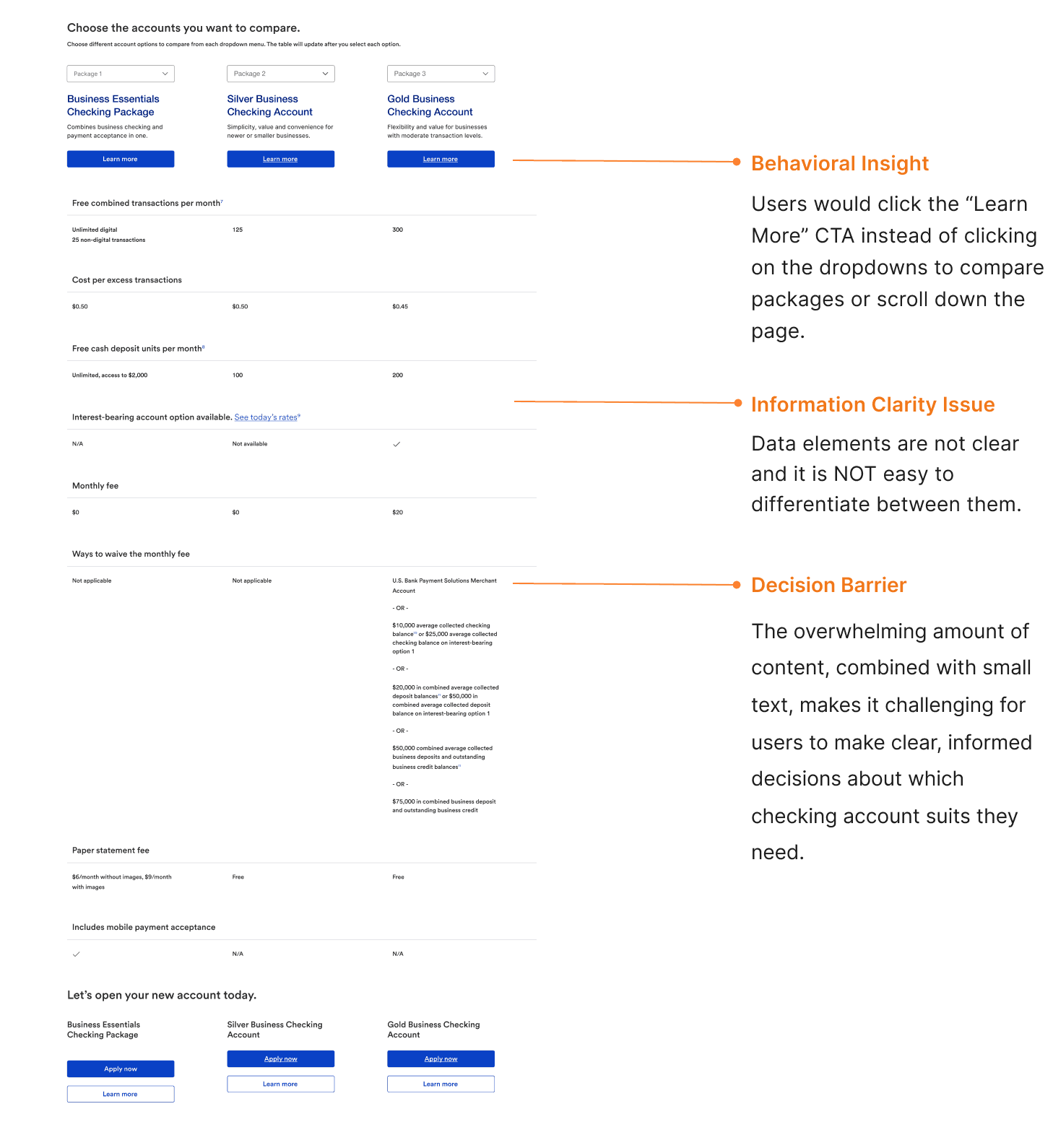
I started with a heuristic audit of the original comparison tables to understand why the experience felt difficult to use. The audit revealed a pattern of structural friction: too much information at once, weak hierarchy, inconsistent grouping, and poor scanability.
I then ran usability testing with 15 small business owners and asked them to compare accounts and identify the best fit for specific business needs. Their feedback reinforced the same problem from a user perspective: the layout made it hard to quickly find the features that mattered, compare options confidently, and retain key differences between accounts.
What I found
Too much information was presented at once, creating clutter.
Important differences weren’t visually emphasized.
Users struggled to quickly scan and compare key details.
Inconsistent alignment and grouping made the experience feel harder to process.
60% of participants struggled to locate key features because of the cluttered layout.
The design strategy: reduce cognitive load without losing critical detail
The goal wasn’t to simply “make the tables cleaner.” It was to help users compare products more confidently while preserving the depth of information required in a financial context.
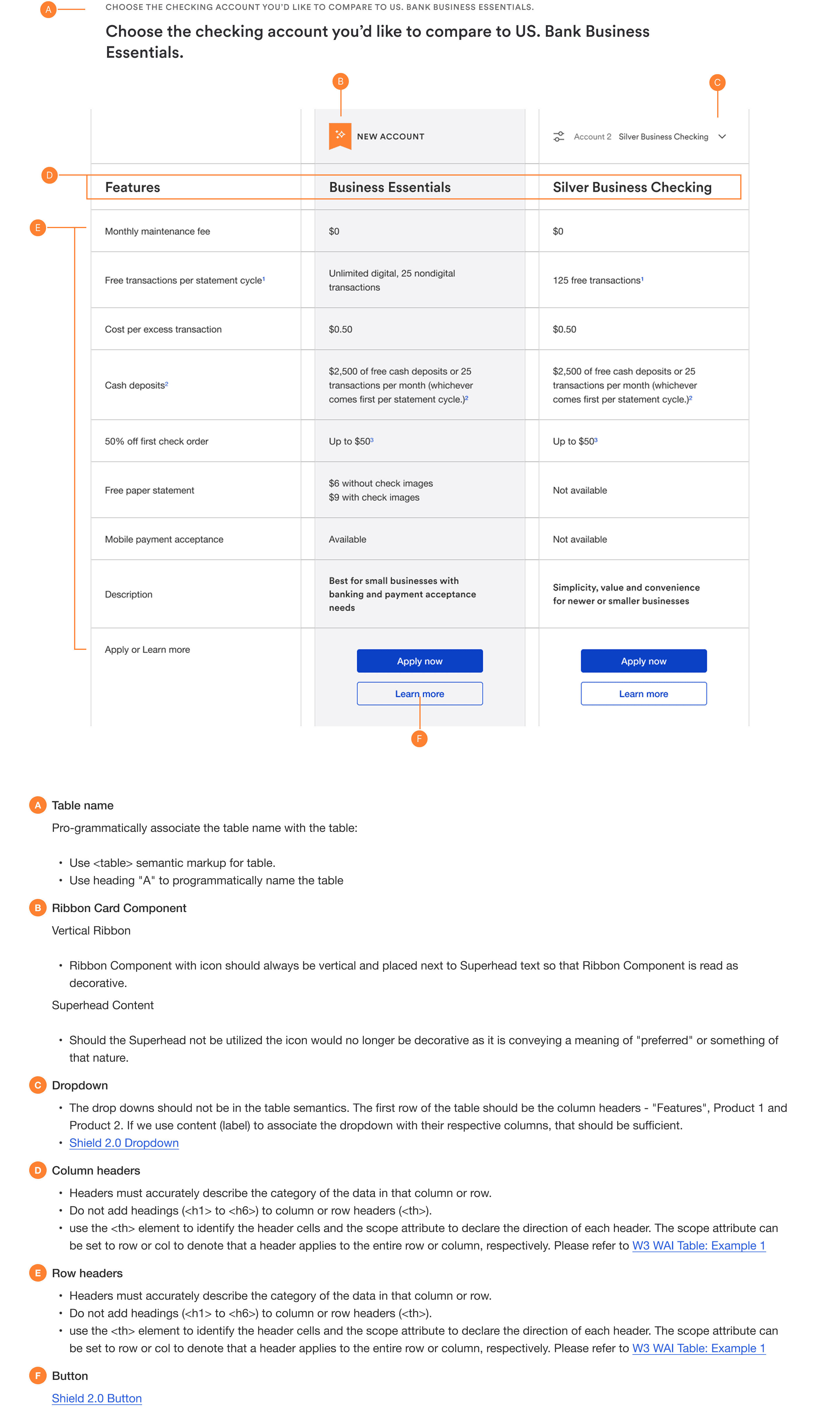
I redesigned the comparison experience to be dynamic and user-controlled, allowing people to choose which products they wanted to compare instead of forcing them to process every option at once. This made the pattern more scalable, especially when more than five products or services were in play and gave users a clearer, more focused way to evaluate differences
Key design decisions
Decision 1: Let users control what they compare
Instead of showing every possible option in a fixed, overloaded layout, I redesigned the experience so users could select which products they wanted to compare. This reduced overwhelm, improved focus, and made the component more scalable across a wider range of product sets.
Decision 2: Improve scanability through hierarchy and grouping
I simplified the visual structure to make key differences easier to find. That meant emphasizing the most important product features, tightening grouping logic, and reducing the amount of effort required to scan row-by-row. The goal was to support faster, more confident decision-making without stripping out important financial detail.
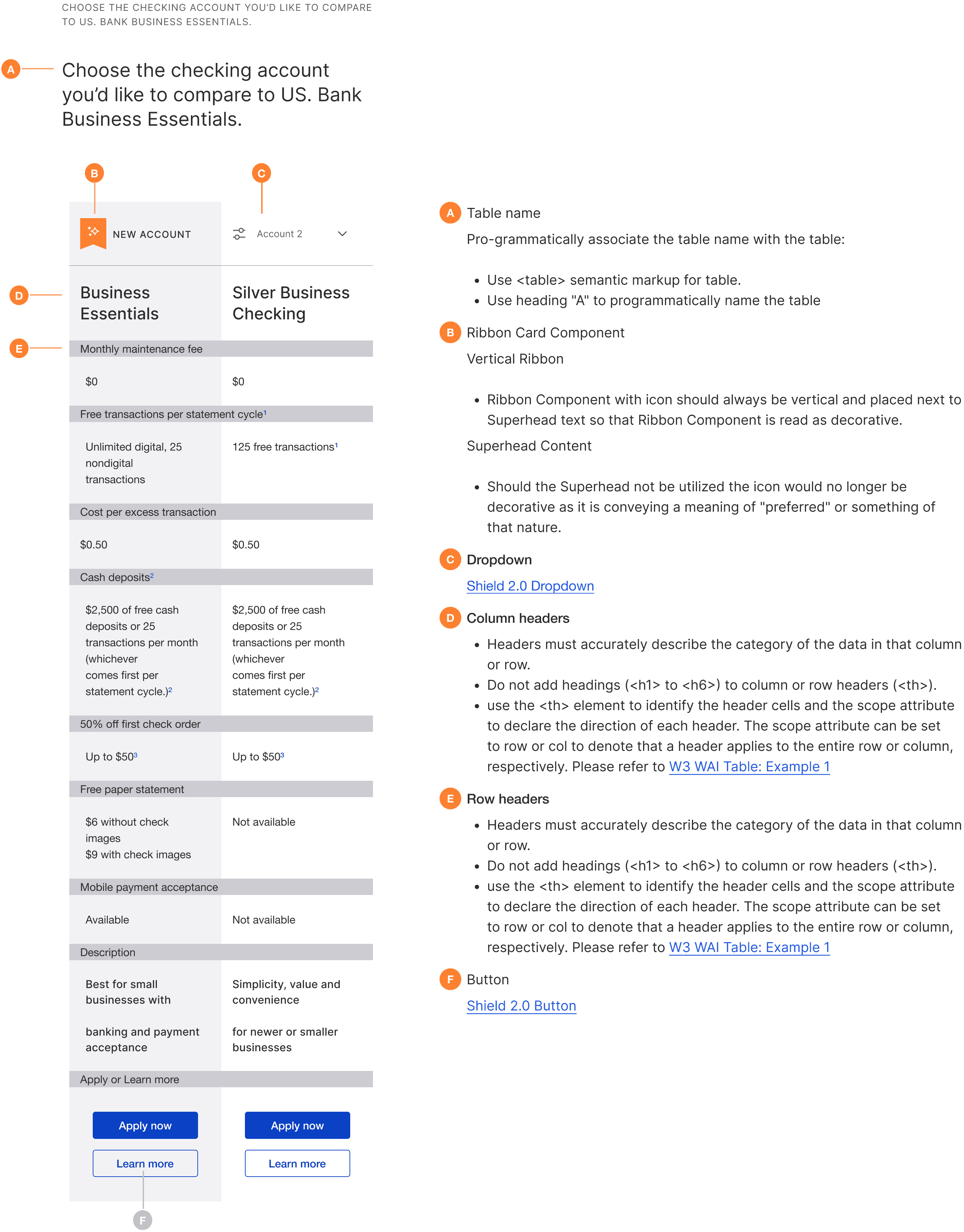
Decision 3: Preserve side-by-side comparison on mobile
A major tradeoff was mobile behavior. Instead of stacking content vertically which would break comparison and force users to hold too much context in memory. I preserved a horizontal side-by-side structure optimized for smaller screens. This kept the comparison model intact while reducing context loss.
Decision 4: Design the pattern for reuse, not just one page
I treated the table as a reusable component, not a one-off redesign. The interaction model, content structure, and responsive behavior were designed to support multiple product lines and future implementations, which is why developer clarity and system alignment became part of the UX work itself.
Tradeoffs and constraints
A big part of this work was balancing clarity, completeness, and system feasibility.
01
Simplicity vs financial detail
Financial comparison experiences need depth, but too much detail at once creates overload. I focused on surfacing the most important differences clearly while preserving access to supporting detail.
02
Mobile flexibility vs comparison integrity
Stacking content vertically might have been simpler to implement, but it would have weakened the user’s ability to compare options side-by-side. Preserving horizontal comparison on mobile was a deliberate UX choice to support better decisions.
03
Better UX vs system constraints
The redesign had to work within AEM and the Shield Design System. That meant creating a pattern that improved usability without introducing behavior that would be difficult to implement or maintain at scale.
How we shipped: turning a redesign into reusable infrastructure
To make the redesign usable beyond a single page, I created annotated UX specifications and a developer guide that translated the interaction model into something implementation teams could consistently follow. This documentation covered layout behavior, semantic structure, sticky headers, responsive logic, and accessibility considerations.
This part of the work mattered because the success of a component in an enterprise environment isn’t just about the design file. It’s about whether product, content, and engineering teams can implement it consistently without reinterpreting the pattern every time.
Reflection: what this taught me about scalable UX
Redesigning this component wasn’t just a UI exercise. It was a systems challenge. I learned that scalable enterprise UX requires more than a cleaner interface. It requires designing patterns that reduce user effort, support implementation clarity, and can be adopted consistently across teams over time.
This project deepened how I think about:
Designing for sustainability - solving for multiple future use cases, not just one page.
Working within system constraints - using AEM and Shield not as blockers, but as design parameters.
Component-level strategy - treating decision-support patterns as product infrastructure, not just interface elements.
If I were extending this work, I’d look at how the component performs across more product categories, where comparison fatigue still shows up, and how the interaction model could support even more complex product sets without increasing cognitive load.